Many employees of the United States Postal Service rely on online systems to manage their salary, taxes, and benefits efficiently. One of the most widely used tools is LiteBlue PostalEASE, which allows employees to update direct deposit, tax withholdings, and benefit elections without manual paperwork.
However, a common concern among employees is that changes made in PostalEASE do not appear in the very next paycheck. This creates confusion and sometimes panic, especially when financial adjustments are time-sensitive. Understanding why this happens is essential to avoid unnecessary stress and to manage expectations properly.
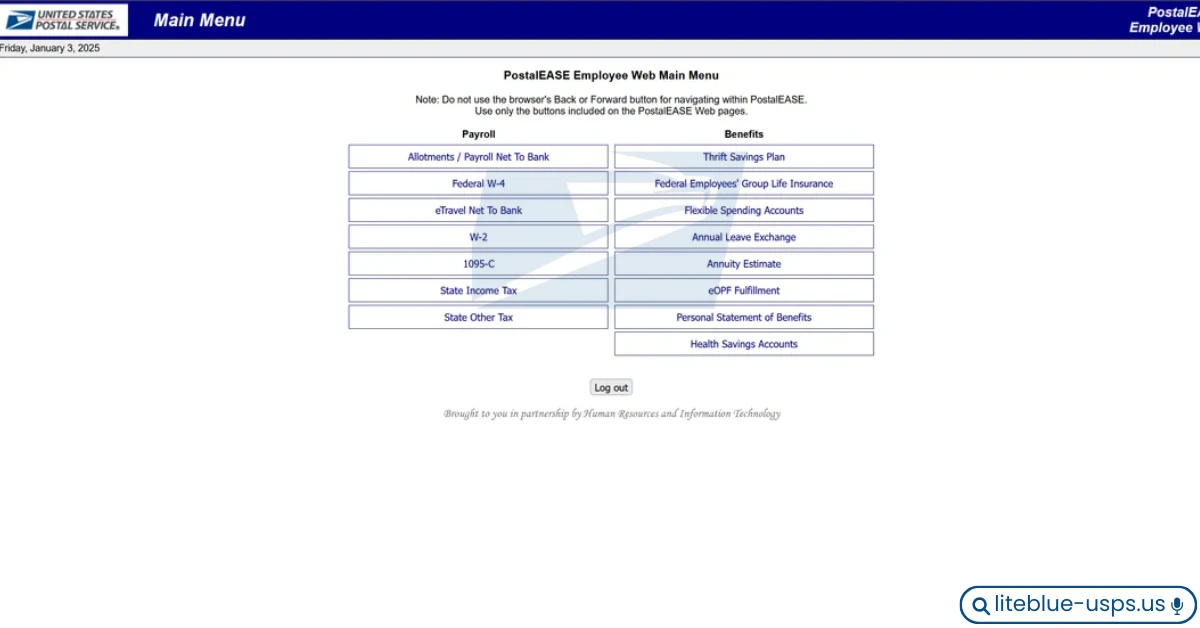
This guide explains in detail the reasons behind delays, how the system actually works, and what you can do to ensure your changes are processed correctly.
Understanding How PostalEASE Processing Works
Before diving into the issue, it is important to understand that PostalEASE does not update paycheck data instantly. The system is connected to a larger payroll infrastructure that operates on fixed cycles. USPS payroll follows a structured schedule: pay periods are typically biweekly, payroll processing begins several days before payday, and changes must be submitted before a cutoff deadline. If you make a change after payroll processing has already started, it will not reflect in the upcoming paycheck but instead in the following one.
Main Reasons Why Changes Do Not Reflect Immediately
1. Payroll Cutoff Deadlines
Every pay cycle has a cutoff date. Changes made before the cutoff are included in the next paycheck, while changes made after the cutoff are delayed to the following cycle. This is the most common reason employees do not see updates immediately.
2. Processing Time Lag
Even if you submit changes on time, the system still needs time to process them. Typical delays include system validation checks, data synchronization between systems, and internal approvals in some cases.
| Type of Change | Processing Time |
|---|---|
| Direct Deposit | 1–2 pay cycles |
| Tax Withholding | Next pay cycle |
| Benefits Enrollment | Varies (Open Season dependent) |
3. Type of Change Made
Not all updates behave the same way. Direct deposit changes may take longer due to bank verification, tax updates are usually faster, and benefit changes may follow specific enrollment rules tied to Open Season or qualifying life events.
4. System Update Frequency
PostalEASE does not operate in real-time. Updates occur in scheduled batches, and some changes are queued for the next processing window. This means even correctly submitted updates may not show up immediately.
5. Incomplete or Incorrect Information
Errors during submission can delay processing. Common mistakes include incorrect bank account numbers, missing required fields, and wrong tax details. If the system flags an issue, your request may not be processed until the error is corrected.
6. Confirmation Number Misunderstanding
After submitting a change, you receive a confirmation number. It is important to understand that this confirmation means your request has been received — it does not guarantee immediate processing.
7. Multi-System Dependency
PostalEASE works with multiple systems including payroll processing systems, HR databases, and banking networks. If one system experiences a delay, the entire update may be affected.
Detailed Breakdown of Common Changes
Direct Deposit Changes
Direct deposit updates are among the most sensitive changes. Delays occur because bank verification is required, security checks are performed, and routing accuracy must be confirmed before funds can be redirected.
Tax Withholding Updates
Tax changes are relatively faster but still depend on payroll cycles. Changes reflect in the upcoming paycheck if submitted before the cutoff; otherwise they move to the next cycle.
Benefits Changes
Benefits updates follow strict rules. For example, Open Season changes only take effect from January, while qualifying life events may follow different timelines depending on the nature of the change.
Timeline Example
Here is a practical example to illustrate how cutoff timing affects when your change appears.
| Event | Date |
|---|---|
| Pay Period Ends | 10th |
| Payroll Processing Starts | 11th |
| Payday | 15th |
| Change Submitted | 12th |
In this scenario, your change will not appear on the 15th paycheck because payroll processing had already started on the 11th when the change was submitted on the 12th.
How to Ensure Your Changes Reflect on Time
To maximize the chances of your changes being processed in the current pay cycle, submit changes early in the pay period, double-check all entered information, save your confirmation numbers, avoid last-minute updates, and monitor your pay stub regularly after changes are made.
Best Practices for Employees
Always plan financial changes ahead of payday, use a secure and stable internet connection when submitting updates, keep personal records of all changes made, and review previous paychecks for comparison. These habits reduce the risk of missed or delayed updates significantly.
Common Problems and Their Solutions
Change Not Reflected After One Pay Cycle
Wait for the next cycle, verify your submission details for accuracy, and contact HR if the issue is still unresolved after two full pay cycles.
Incorrect Deposit After Update
Check the bank details you entered, confirm the routing number, and submit an updated request if any information was incorrect.
No Confirmation Received
Re-submit your request, ensure the system fully completes the process before closing your browser, and avoid navigating away from the page during submission.
When to Contact Support
You should reach out for help if changes do not reflect after two pay cycles, you notice incorrect deductions, there is a missing paycheck update, or system errors prevent submission entirely. Early escalation helps prevent issues from compounding across multiple pay periods.
Key Differences Between Immediate and Delayed Changes
| Factor | Immediate Changes | Delayed Changes |
|---|---|---|
| Submission Time | Before cutoff | After cutoff |
| System Processing | Within current cycle | Next cycle |
| Complexity | Simple updates | Complex verification required |
How This Affects Financial Planning
Understanding these delays is important for budget management, loan payments, bill scheduling, and savings planning. Failing to account for processing time can lead to financial inconvenience, particularly when changes are made close to important payment dates. Always build in a buffer of at least one full pay cycle when planning financial changes.
Advanced Insight: Why the System Works This Way
PostalEASE is designed with security and accuracy in mind. The structured processing exists to prevent fraud, ensure data integrity, maintain payroll accuracy, and handle the large volume of employee updates across the organization. Instant updates would increase the risk of errors, which is why controlled batch processing is a deliberate and necessary design choice.
Frequently Asked Questions (FAQs)
Conclusion
PostalEASE is a powerful system that gives USPS employees control over their financial and benefit settings. However, it operates within structured payroll cycles, which means changes are not always immediate.
By understanding cutoff times, processing delays, and system workflows, employees can avoid confusion and manage their expectations more effectively. Planning ahead, submitting accurate information, and monitoring paychecks regularly are the best ways to ensure a smooth experience. Instead of assuming an error when changes do not appear right away, recognizing how the system works will help you stay in control and make informed decisions about your payroll and benefits.